bophoto

Expertise:

  • 3D modeler
  • Designer
  • Product designer
by bophoto
arDrone 2.0 bracket for GoPro 1 & 2 cameras
NOT COMPATIBLE with GoPro HERO3 - New design will be available shortly.

NEW click here for GoPro Hero3 mount for arDrone 2

This is 5 parts which must be cut appart before installation.
Instructions for installing the mount on your arDrone https://vimeo.com/55233318

EDIT - just added the extender to this product, it is two parts, put foam between them to lower the camera and further reduce vibrations.

I have some video on Vimeo, this was shot in WINDY conditions and look pretty bad, but you get the idea, as soon as the weather in LA improves for flying small copters, I will be updating the video. www.vimeo.com/41468132

GoPro Hero2 - I recommend cutting a disc of Lee Filter 9ND-P3 and sticking it under the glass on the protective cover as that will reduce the shutter speed and practically eliminate jello.

GoPro Hero1 - have slower shutterspeed and don't suffer as much from jello as hero2, but you can also use ND film to further reduce jello if required.

All kinds of precautions apply to this product, Im not responsible for your flying of this. or what you may do to your arDrone or GoPro camera... if somebody print this in red, do send me some pictures.

NOTES on getting beautiful video with arDrone-GoPro combinations. First, you MUST understand that even the arDrone 2.0 is under powered for wild flying. to stay in the air it must use power to force air down.. when you hang a GoPro under it, the battery empty faster because it use more power.
NEXT, understand moving, happens by the drone tilting, so it essentially is "sliding down a hill" by being at a angle.. so now to keep the same altitude the motor must work even harder.
Combining the sliding down a hill motion and the weight of the GoPro, means you are operating at the limit of what is possible with a arDrone. as a result the props and motors work hard creating lots of vibrations and shaking.
The solution is flying EARLY in the morning, when the air is cool and there is absolutely no wind or even a breeze, in completely still air, the arDrone do not need to compensate for wind and will fly much more stable and smoothly, and the motors will have less work to do, resulting in less vibrations. Early morning flights is key to getting amazing beautiful video from a GoPro mounted under a arDrone. There.. NOW you know. Happy Flying.

This sale include all parts required to mount you GoPro, arms and the adjustable cradle, it do NOT include arDrone, GoPro, GoPro protective lens.
 
(0)  
  •  
From: $53.67
 
by bophoto
Mount your GoPro camera on a SteadiCam Smoothee, now you have a waterproof camera on a steadicam.. let the fun begin. Steadicam at the beach, the pool or in the pouring rain.

Mount your GoPro upright and straight,  the ability to angle the camera do not do anything useful as the camera fisheye lens will see the bracket if you look down with it.

Note - the bracket should have a tight fit, it should snap into the Smoothee with a light amount of force, however there is a bit of tolerance/error in wall accuracy when 3D printing, if it is any harder than that, gently sand the edges and side of the bracket slightly and try again. The tight fit is important to prevent vibrations.

You can use this with both a regular GoPro and also with the GoPro with display backpack. some balancing required, you should not purchase this unless you understand the basics of balancing your SteadiCam Smoothee.

The balance with the display backpack is amazing, the original iPhone mount with phone is about 228grams and the GoPro with display and mount is about 226 grams, this works very well.

SteadiCam Smoothee is a trademark of Tiffen, this product have no relationship to Tiffen or SteadiCam, it is a aftermarked accessory bracket for the GoPro camera.

Using Strong & Flexible material, I drilled the shape out a bit to save some material.
 
(1)  
  •  
From: $18.26
 
by bophoto
GoPro Hero3 cradle for the arDrone 2.0 mounting kit.
***Accepts the classic GoPro protective wide-lens***
*** You NEED a old style GoPro lens ring and protective lenses ***

Test video with the Hero3 on arDrone 2.0 https://vimeo.com/54118695

Instructions for installing the mount on your arDrone https://vimeo.com/55233318

If you already purchased a GoPro or a ReplayXD kit for your arDrone 2.0 - then this camera mount will work with your arDrone 2.0 body mounts.

This mount will ONLY fit the GoPro Hero3 camera style cameras, any color.

You will need unscrew the protective glass lid and frame from the GoPro's impact case, install it on the front of this mount by pressing the screws into the plastic gently while turning them.

Mount was updated Dec1 to loose some weight and fit better to the Hero3 I also added the rail-kit for mounting to the arDrone, and the extender-kit so you can drop the camera down a bit to get better visibility forward under the arDrone.

I recommend using something like a 10x10 inch box for launching, rest the drone arms on the box edges and let the camera hang freely in the box. land in soft grass or fly at 5 feet and have a friend catch the arDrone then press "emergency" to stop motors once safe.

Install the camera by sticking the lens into the hole and wrapping 2 rubberbands around the entire thing. *I have never actually busted a rubberband, but two sounds safer than one so that is how I fly.

Here is how to install
Remove the hard plastic bottom cover from your arDrone, I use a butter-knife to life the edge at the tail and then peel away. then remove the 4 screws from the electronics board. Place the long-parts (the rails) on top of the board and fasted by replacing the screws back into the holes, the screws will now hold both the board and the bracket which the camera mount installs into.
I prefer to put some clear plastic wrapping tape over the board to avoid getting dirt or wet grass on the control board.
 
(0)  
  •  
From: $49.72
 
by bophoto
Low profile arDrone bracket for GoPro cameras.

NOTE - This bracket is for the ORIGINAL arDrone ONLY - it do not work with arDrone 2.0

NEW GoPro Hero3 mount for arDrone 2

- NOTE - it is possible to fly a GoPro with a arDrone - however it is not a stable flight and you may crash. This bracket do not magically make the arDrone able to carry a heavy load,

FEATURES

The camera can be mounted forward or backwards, so you can video back and keep the props out of the image.
Low profile - the mounting bracket-rails are 10mm so the arDrone can land flat when the camera is removed.
TWO mounting kits, for far rear mount or a more centered mounting position.

The REAR mount the will work with iPhone flight control, the center mount will only work with the arDrone RCmod package.

NOTE. camera mount will accept lens cover from the GoPro case, unscrew and place camera mount flat on table then push screws into plastic for first time installation. (Printed kit do not include the GoPro case protective glass or hardware.)

In the sideview picture, the battery is shown pushed forward to improve arDrone balance, I looped a rubber band through the rib in the battery box, then wrap it around the battery to keep it firm. this helps the drone fly more stable. make sure the battery do not rest on the RC mod as it should not be transferring vibrations to the electronics.
 
(2)  
  •  
From: $55.79
 
by bophoto
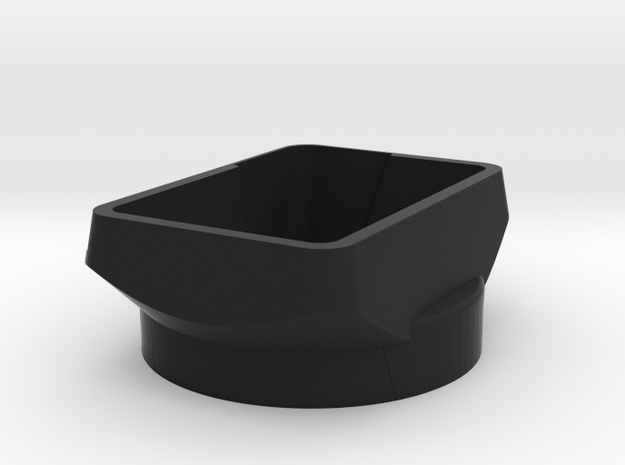
Rangefinder lenshood for Voigtlander 35mm 1.4 Nokton lens

This hood is VERY agressive, it cut light as tightly as possible to protect contrast in your photography and to remove flare from strong light sources such as street lights when shooting on the street, I made the design for use with hot studio lights.
This hood will cut much more flare than the standard Nokton 35mm hood.
The hood material have been made thinner towards the viewfinder to reduce the hood blocking the view through the viewfinder.

The attached pictures show a rather rough finish hood, this was made on my UP! 3D printer for the purpose of prototyping, the version you can order here is made with "Black Strong & Flexible" which is a smoother matte black material, beautifully suited for lenshood with no shiny surfaces. The printed hood from ShapeWays in Stong & Flexible, it is working very well.
 
(3)  
  •  
From: $39.78
 
by bophoto
GoPro mount for the arDrone

This bracket face rear so the GoPro can capture video without seeing the propellers of the arDrone.
Install the GoPro lens protector from the GoPro case to the BEEFY bracket using the GoPro screws. Then stick the GoPro lens through the hole and wrap a beefy rubber-band around the bracket and GoPro cam, secure the rubber-band on the round hook on the bottom of the bracket.

Before attempting to fly a GoPro camera please make sure you understand the limitations of the arDrone.

NOTE. camera mount will accept lens cover from the GoPro case, unscrew and place camera mount flat on table then push screws into plastic for first time installation. (Printed kit do not include the GoPro case protective glass or hardware.)

The arDrone can not "fly" the GoPro. however on a perfectly windless morning, and I really mean windless, it can lift a GoPro to 30m and stand in place on station for a video or still shot.. you can then proceed to pull out or in at a SLOW pace and it will stay stable for that also..
the reason I describe it that way is simple, at the payload weight the arDrone is maxed out. the way these things fly forward is by tilting, so essentially the ardrone is sliding down the air when tilted.. to compensate for the "sliding" it have to constantly climb up at a pace matching the height it is loosing while sliding down the hill.. so the hill gotta keep coming up at the arDrone.. the physics is simple, but the problem is that the arDrone is almost out of power for climbing, IF it encounters a small bump in the air, it may flip because it is out of power to stabilize itself... and since the ardrone shuts itself off at 45 deg, this minor bump in the air, will effectively flip and shut down the arDrone 30m in the air. (powerful quads will fly at 90 deg perfectly happy going like a bat out of hell - for comparison my big quad consumes TWO 600gram battery in in the same time the arDrone consumes one little battery.)
 
(0)  
  •  
From: $41.30
 
by bophoto
arDrone 2.0 bracket for replayXD 1080 cameras

NOTE - This bracket ONLY work with arDrone 2.0
NEW GoPro Hero3 mount for arDrone 2

This is 3 parts which must be cut apart before installation.
Instructions for installing the mount on your arDrone https://vimeo.com/55233318

I have some video on Vimeo, shot with my replayXD 1080 camera mounted to the arDrone 2.0
Evening shot - www.vimeo.com/42382485
Morning light - www.vimeo.com/41816051 daytime flying, skip to last 30sec to see the replayXD camera mounted on the flying arDrone 2.0

All kinds of precautions apply to this product, I'm not responsible for your flying of this. or what you may do to your arDrone or replayXD camera... but by all means, send me links to whatever you do with this bracket.

NOTES on getting beautiful video with arDrone-replayXD camera combinations. First, you MUST understand that even the arDrone 2.0 is under powered for wild flying. to stay in the air it must use power to force air down.. when you hang a replayXD under it, the battery empty faster because it use more power.
NEXT, understand moving, happens by the drone tilting, so it essentially is "sliding down a hill" by being at a angle.. so now to keep the same altitude the motor must work even harder. Combining the sliding down a hill motion and the weight of the replayXD, means you are operating at the limit of what is possible with a arDrone. as a result the props and motors work hard creating lots of vibrations and shaking.
The solution is flying EARLY in the morning, when the air is cool and there is absolutely no wind or even a breeze, in completely still air, the arDrone do not need to compensate for wind and will fly much more stable and smoothly, and the motors will have less work to do, resulting in less vibrations. Early morning flights is key to getting amazing beautiful video from a replayXD 1080 mounted under a arDrone. There.. NOW you know. Happy Flying.

Another important tip, change the replayXD camera settings file to BTR=H (bitrate = high) this significantly improve the video quality when you have moving items and lot of texture. I also like to reduce the exposure compensation a little so bright spots don't burn out as much. Personally i find shooting 1080 with high bit-rate, even though i always resize to 720p later, this is the setting with the better final result quality in my experience.

Im really impressed with the new total control concept, it is very cool for video, but I often prefer regular RC style control and like to use the RChack from www.macdrones.com

This sale include all parts required to mount you replayXD 1080 on a arDrone 2.0, the two arms and the adjustable cradle, it do NOT include arDrone, or replayXD 1080 camera or parts.
 
(0)  
  •  
From: $39.55
 
by bophoto
iPad 3 - stick on - mount for iPro lenses

What do this odd thing do anyway..? its simple, mount the iPro lensystem from Century optics to a iPad. with double sided tape
*note this mount works with the fisheye and wideangle lens from iPro.

For my own use I used the 3M control strip because it is easy to pull on the tab to remove.

The iPro lens system can be found on Amazon at http://www.amazon.com/iPro-Lens-System-Fisheye-Wide-Angle/dp/B00667SZTE/ref=sr_1_1?ie=UTF8&qid=1334889873&sr=8-1

Enjoy and please do let me know how you use these.
 
(1)  
  •  
From: $9.44
 
by bophoto
Got tired of rolling my Phantom when landing a bit fast.

These will slide and still have room for the video downlink under the belly. note the upturned tips to prevent catching the grass or whatever you are landing in.

Modding your DJI Phantom and Flying these is entirely are your own responsibility.

DJI tech support points out that it is hugely important to always have the cable from the compass UP, so the compass is in the exact same orientation as it was originally from DJI..!!!!
 
(0)  
  •  
From: $56.63
 
by bophoto
Hero3 mount for DJI Phantom quad

- PROTOTYPE DESIGH - NOT FINALIZED - My Phantom quad arrived this week, it flies beautifully but mine shakes like a washing machine on spin cycle. The DJI props were way unbalanced, and I have ordered a set of APC props. which I will be balancing the "heck" out of before expecting any smooth video.

----

This bracket is incredible light and will not add much to the load of your Phantom, light is always better with flying things.

The mount is created with a ring where you can mount a round gopro protective lens with a black GoPro lens-ring. however, the DJI Phantom is a very stable flying device, so I personally is likely to fly this without a protective glass. the important part is you have the option.! and if you fly in the desert or other sandy areas, protective glass is a great idea.

See pictures for install instructions, you need 1cm thick sorbothane strips, use gell superglue (crazy glue) to attach the strips under the two flat mounting rails, next place 3M double sided table under each of the two sorbothane strips for mounting to the bottom of the Phantom. I suggest attaching the two mounting rails to the camera mount before sticking in place on the Phantom to make sure spacing is correct.
BTW, the gell crazy-glue sticks like crazy to the plastic and sorbothane, so try to get it straight on first try.. ;-)
The ridges (bumps) on the camera mount arches is to keep it firmly in place, there are some variety in printing, if you feel the ridges are too firm to install, simply sand them gently with a bit of sandpaper until the mount installs with less force, PM me if in doubt.

This kit contains 3 parts, one GoPro Hero3 mount and two mounting rails/tracks. Camera is NOT included in this kit.

For installation, you need a bit of 10mm sorbothane, gell-style crazy-glue, 3M thick industrial double-side tape, scissors. Installing and flying this kit with your GoPro is entirely at your discretion, since I can't see and check your install I can not accept any liability for damage caused by using this product. if you do not feel you are able to install this correctly and fly the camera safely, you probably should not order this.
 
(1)  
  •  
Not For Sale
 
by bophoto
Quick Release plate to mount a regular camera on top of a Tiffen Smoothee.

For obvious reasons, the quick-release is not large, and the Smoothee is a light-weight design, large cameras are unlikely to work well on the smoothee, don't blame me. :-) However most modern consumer cameras about the size of a soda-can or slightly larger should work quite well.

Anti-skid-pad, I recommend making a "pad" from a piece of 3M thick double side tape, see the picture, I cut mine to fit inside the raised edge, and after applying it, I used my Xacto knife to cut out the hole for the screw, dirty the top part a little so it don't stick to everything, this fixed my camera in place nicely and prevented rotation.

Material is "Strong & Flexible" which have a bit of give, but at 3mm wall thickness is quite solid.

Included in this sale is only the plate, you wil need to find a 1/4 screw and some thick double side tape, from your local hardware store or a camera shop.

Instructions on modifying a TIffen Smoothee from the CheesyCam blog
http://cheesycam.com/diy-steadicam-smoothee-mod-cheesycam-baby-merlin/

DISCLAIMER ONLY you can judge if the piece is appropriate to hold your camera. You alone are responsible for the use and consequences of using this product.
 
(0)  
  •  
Not For Sale
 
by bophoto
CROPFACTOR lenshood for Zeiss 28mm 2.8 (Biogon) This hood is designed to be tight when the hood is used on a Leica M8, the hood will work on the Zeiss 28mm 2.8 as long as the lens is not used on a full-frame camera. If the hood is used on full-frame cameras it may cause a bit of vignetting (darkening) along the edges unless it is stopped down.
 
(0)  
  •  
From: $33.01
 
by bophoto
STICK ON - iPro lens mount for iPhone5 & iPad
This design will work with virtually any phone with a flat surface for attaching. simply stick and shoot.

Attaches with 3M control strip tape, two of the small version. pull the tap of the tape to remove, if you plan to leave on the phone for a longer period, you can trim the taps before sticking the mount to the phone, to remove rotate the mount until the tape release.

Centering of the lenses is critical for good results, after mounting a lens, look through the lens from the front, and see that the iPhone lens is centered in the lens, nudge clip if required.

The iPro lenses have a odd flange mount, at first I thought it would be like every dslr camera, camera flange press against the lens and the bayonet pulls the lens in towards the camera until firm. and I made the mount with this design, this worked for the first two lenses, but the x2 tele did not work with that scheme, it turns out that iPro did go the other way, and instead press the lens against the bottom of the mount, agains the iPhone almost, and the bayonet when turned press the lens against the thin material at the bottom of the mount.. my personal opinion would have been to create this mount as a traditional bayonet mount, but clearly schneider had different ideas. So with my apologies for their design choices, here is the revised mount which accommodates the all the current iPro lenses (wideangle, fisheye and 2X tele)

I should state a disclaimer, the iPro lenses was made directly for iPhone 4, it appears that the optical path on the iPhone5 is slightly different, because I have not managed to get the same great optical performance on the 5 as I get from the 4.
 
(0)  
  •  
Not For Sale